|
|
|
|
|
|
| |
| |
|
|
|
|
| |
| |
|
|
I've made a few minor changes to smooth the camera path. I'm still unhappy with
the flickering. I've read a few articles, but the only methods that apply to
povray was to disable jitter(which is already disabled), increase anti-aliasing,
render at larger resolution then downscale, and reduce detail. There are 1501
frames in the animation. At that size the resolution that fits within the 5M
post limit is 640x360. Since I distribute the renders across 3 PCs I made sure
that all renders are done on the same environment. After a little experimenting
with anti-aliasing, the best result was using +a0.0 +am2. I tried 3 resolutions:
640x360, 1920x1080, and 3840x2160, downsizing the latter to 640x360. The
640x360 version flickering is pretty bad. the 1920x1080 is better but still not
great. The 3840x2160 is quite a bit better but does not eliminate the flicker.
The main problem with rendering at higher resolution and then downscaling is a
dramatic increase in render time. The 640x360 takes under 20 minutes, 1920x1080
just under 2 hours, 3840x2160 over 7 hours. Before reducing detail are there
any other suggestions I can try? I have posted the 640x360 version with this
post. I'll post the downscaled 3840x2160 version in the following post.
Post a reply to this message
Attachments:
Download '640x360x00x2.mp4.dat' (4631 KB)
|
|
| |
| |
|
|
|
|
| |
| |
|
|
"Clarence1898" <dle### [at] comcast net> wrote:
> I've made a few minor changes to smooth the camera path. I'm still unhappy with
> the flickering. I've read a few articles, but the only methods that apply to
> povray was to disable jitter(which is already disabled), increase anti-aliasing,
> render at larger resolution then downscale, and reduce detail. There are 1501
> frames in the animation. At that size the resolution that fits within the 5M
> post limit is 640x360. Since I distribute the renders across 3 PCs I made sure
> that all renders are done on the same environment. After a little experimenting
> with anti-aliasing, the best result was using +a0.0 +am2. I tried 3 resolutions:
> 640x360, 1920x1080, and 3840x2160, downsizing the latter to 640x360. The
> 640x360 version flickering is pretty bad. the 1920x1080 is better but still not
> great. The 3840x2160 is quite a bit better but does not eliminate the flicker.
> The main problem with rendering at higher resolution and then downscaling is a
> dramatic increase in render time. The 640x360 takes under 20 minutes, 1920x1080
> just under 2 hours, 3840x2160 over 7 hours. Before reducing detail are there
> any other suggestions I can try? I have posted the 640x360 version with this
> post. I'll post the downscaled 3840x2160 version in the following post.
Well Boss, I'm not going to say that I understand exactly what the problem is,
but I will throw a few things out there.
fwidth. Look it up, play with it. It's a way to do some amazing things.
I you find my spiral pattern, it's only 6 lines of code.
But it doesn't show anything recognizable without that fwidth function.
And then it's amazing.
Read this article:
https://bgolus.medium.com/the-best-darn-grid-shader-yet-727f9278b9d8
I'm not saying that it's going to totally fix your problem, but there's a lot
there for serious POV-Rayers to think about and benefit from.
Perhaps use some different ant-aliasing settings, and search for comments by
Alain and clipka. doing a very deep, fine antialiasing might be better and
faster than doing huge time-consuming renders and then shrinking them down.
I have opined in the past that we should have some nice antialiasing macros to
help sort out all of the different modes and options. Maybe you can look into
coding a first draft.
ffmpeg has some great settings for chopping down the file size yet keeping the
video quality the same.
Look into mip-mapping. Don't know exactly what it is, or how to use it, or if
we can do that in POV-Ray.
I do believe that Martijn Steinrucker of Art Of Code youtube channel might cover
it in his "The Drive Home" series
https://www.youtube.com/watch?v=WrxZ4AZPdOQ
Also:
https://alvyray.com/Memos/CG/Microsoft/6_pixel.pdf
In summary, I think that there must definitely be a [good] way to get rid of
your flickering - we just need to find out what it is.
- BE net> wrote:
> I've made a few minor changes to smooth the camera path. I'm still unhappy with
> the flickering. I've read a few articles, but the only methods that apply to
> povray was to disable jitter(which is already disabled), increase anti-aliasing,
> render at larger resolution then downscale, and reduce detail. There are 1501
> frames in the animation. At that size the resolution that fits within the 5M
> post limit is 640x360. Since I distribute the renders across 3 PCs I made sure
> that all renders are done on the same environment. After a little experimenting
> with anti-aliasing, the best result was using +a0.0 +am2. I tried 3 resolutions:
> 640x360, 1920x1080, and 3840x2160, downsizing the latter to 640x360. The
> 640x360 version flickering is pretty bad. the 1920x1080 is better but still not
> great. The 3840x2160 is quite a bit better but does not eliminate the flicker.
> The main problem with rendering at higher resolution and then downscaling is a
> dramatic increase in render time. The 640x360 takes under 20 minutes, 1920x1080
> just under 2 hours, 3840x2160 over 7 hours. Before reducing detail are there
> any other suggestions I can try? I have posted the 640x360 version with this
> post. I'll post the downscaled 3840x2160 version in the following post.
Well Boss, I'm not going to say that I understand exactly what the problem is,
but I will throw a few things out there.
fwidth. Look it up, play with it. It's a way to do some amazing things.
I you find my spiral pattern, it's only 6 lines of code.
But it doesn't show anything recognizable without that fwidth function.
And then it's amazing.
Read this article:
https://bgolus.medium.com/the-best-darn-grid-shader-yet-727f9278b9d8
I'm not saying that it's going to totally fix your problem, but there's a lot
there for serious POV-Rayers to think about and benefit from.
Perhaps use some different ant-aliasing settings, and search for comments by
Alain and clipka. doing a very deep, fine antialiasing might be better and
faster than doing huge time-consuming renders and then shrinking them down.
I have opined in the past that we should have some nice antialiasing macros to
help sort out all of the different modes and options. Maybe you can look into
coding a first draft.
ffmpeg has some great settings for chopping down the file size yet keeping the
video quality the same.
Look into mip-mapping. Don't know exactly what it is, or how to use it, or if
we can do that in POV-Ray.
I do believe that Martijn Steinrucker of Art Of Code youtube channel might cover
it in his "The Drive Home" series
https://www.youtube.com/watch?v=WrxZ4AZPdOQ
Also:
https://alvyray.com/Memos/CG/Microsoft/6_pixel.pdf
In summary, I think that there must definitely be a [good] way to get rid of
your flickering - we just need to find out what it is.
- BE
Post a reply to this message
|
|
| |
| |
|
|
|
|
| |
| |
|
|
hi,
"Clarence1898" <dle### [at] comcastnet> wrote:
> I've made a few minor changes to smooth the camera path. I'm still unhappy with
> the flickering. ...
out of interest, the camera path is spline-based ? (one, or several ?) do you
base movement on the clock, or use frame_number ?
regards, jr.
Post a reply to this message
|
|
| |
| |
|
|
|
|
| |
| |
|
|
"jr" <cre### [at] gmailcom> wrote:
> hi,
>
> "Clarence1898" <dle### [at] comcastnet> wrote:
> > I've made a few minor changes to smooth the camera path. I'm still unhappy with
> > the flickering. ...
>
> out of interest, the camera path is spline-based ? (one, or several ?) do you
> base movement on the clock, or use frame_number ?
>
>
> regards, jr.
The location is based on one spline, the lookat point is base on a second
spline. Both are based on the clock. When the camera enters earth orbit it
changes to a spiral path around it.
Post a reply to this message
|
|
| |
| |
|
|
|
|
| |
| |
|
|
"Bald Eagle" <cre### [at] netscapenet> wrote:
> "Clarence1898" <dle### [at] comcastnet> wrote:
> > I've made a few minor changes to smooth the camera path. I'm still unhappy with
> > the flickering. I've read a few articles, but the only methods that apply to
> > povray was to disable jitter(which is already disabled), increase anti-aliasing,
> > render at larger resolution then downscale, and reduce detail. There are 1501
> > frames in the animation. At that size the resolution that fits within the 5M
> > post limit is 640x360. Since I distribute the renders across 3 PCs I made sure
> > that all renders are done on the same environment. After a little experimenting
> > with anti-aliasing, the best result was using +a0.0 +am2. I tried 3 resolutions:
> > 640x360, 1920x1080, and 3840x2160, downsizing the latter to 640x360. The
> > 640x360 version flickering is pretty bad. the 1920x1080 is better but still not
> > great. The 3840x2160 is quite a bit better but does not eliminate the flicker.
> > The main problem with rendering at higher resolution and then downscaling is a
> > dramatic increase in render time. The 640x360 takes under 20 minutes, 1920x1080
> > just under 2 hours, 3840x2160 over 7 hours. Before reducing detail are there
> > any other suggestions I can try? I have posted the 640x360 version with this
> > post. I'll post the downscaled 3840x2160 version in the following post.
>
> Well Boss, I'm not going to say that I understand exactly what the problem is,
> but I will throw a few things out there.
>
> fwidth. Look it up, play with it. It's a way to do some amazing things.
> I you find my spiral pattern, it's only 6 lines of code.
> But it doesn't show anything recognizable without that fwidth function.
> And then it's amazing.
>
> Read this article:
> https://bgolus.medium.com/the-best-darn-grid-shader-yet-727f9278b9d8
>
> I'm not saying that it's going to totally fix your problem, but there's a lot
> there for serious POV-Rayers to think about and benefit from.
>
> Perhaps use some different ant-aliasing settings, and search for comments by
> Alain and clipka. doing a very deep, fine antialiasing might be better and
> faster than doing huge time-consuming renders and then shrinking them down.
> I have opined in the past that we should have some nice antialiasing macros to
> help sort out all of the different modes and options. Maybe you can look into
> coding a first draft.
>
> ffmpeg has some great settings for chopping down the file size yet keeping the
> video quality the same.
>
> Look into mip-mapping. Don't know exactly what it is, or how to use it, or if
> we can do that in POV-Ray.
> I do believe that Martijn Steinrucker of Art Of Code youtube channel might cover
> it in his "The Drive Home" series
>
> https://www.youtube.com/watch?v=WrxZ4AZPdOQ
>
> Also:
> https://alvyray.com/Memos/CG/Microsoft/6_pixel.pdf
>
> In summary, I think that there must definitely be a [good] way to get rid of
> your flickering - we just need to find out what it is.
>
> - BE
Wow. Thanks for all the information. It will take me a while to digest all of
this. It all looks very interesting. I'll probably start with examining
anti-aliasing closer. Again thank you very much.
Clarence.
Post a reply to this message
|
|
| |
| |
|
|
|
|
| |
| |
|
|
"Clarence1898" <dle### [at] comcastnet> wrote:
> Wow. Thanks for all the information. It will take me a while to digest all of
> this.
You and me both.
> It all looks very interesting.
There is just SO much out there to learn.
Just look at all of the fun that we have coloring tiny little squares on a
screen.
> I'll probably start with examining
> anti-aliasing closer.
No worries.
Maybe the flickering on the checkerboard could be eliminated using a smooth-step
kind of transition between squares rather than a discontinuous jump.
Something along the lines of:
https://news.povray.org/web.60888d70cfb077e41f9dae3025979125%40news.povray.org
https://www.youtube.com/watch?v=60VoL-F-jIQ&t=31s
Then maybe you can change your geometry from CSG to a sort of blobbed
isosurface. (like on the doors)
http://news.povray.org/povray.binaries.images/thread/%3Cweb.5d4b7ce3a683fa3a4eec112d0%40news.povray.org%3E/
Or maybe just using rounded boxes would help some - I really don't know.
Area light for softer shadows?
I'd do highly stripped-down versions of the animation to investigate what
remediates the problematic parts of the animation so that you can get quick
answers without rendering _everything_.
> Again thank you very much.
Of course - I like to think that if we can assemble a group to offer
constructive criticism and helpful suggestions, that we can ALL benefit and
complete a lot more projects in a timely manner.
- BE
Post a reply to this message
|
|
| |
| |
|
|
|
|
| |
| |
|
|
[I happen to be working on an animation of my own right now.]
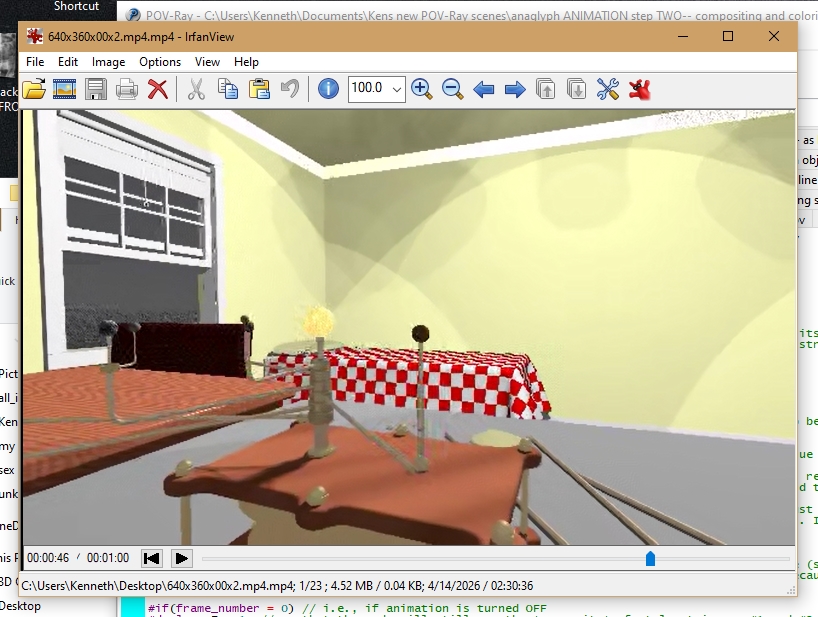
Your 'wip 2' (3840x2160 downsized to 640 X 360) looks *much* better than your
first wip. So the original problem was not due to the MPEG compression your
used-- I checked both videos' 'bit rates', and wip 2 is even more compressed,
slightly. But it still looks quite nice.
I made a screenshot from your wip 1 (see attached.) The window and some other
parts show 'jaggies'-- as if no antialiasing was used at all, which is quite
strange. I would have assumed that your aa2 method would have completely
eliminated those.
Do you still have your original 640 X 360 animation renders from wip 1? Maybe
take a look at some of those, to see if the jaggies are present there.
As B.E. said, a possible problem is that your scene has very sharp narrow lines
and tiny details, which can sometimes react badly to aa. (You mentioned that you
turned off your aa jitter. As a suggestion, try using aa method 1 with a setting
of zero, and turn ON the jitter. Who knows, it might help! I am currently using
that set-up, and the final MPEG animation result looks fine to me.)
Post a reply to this message
Attachments:
Download 'bedroom_screenshot.jpg' (324 KB)
Preview of image 'bedroom_screenshot.jpg'
|
|
| |
| |
|
|
|
|
| |
| |
|
|
"Kenneth" <kdw### [at] gmailcom> wrote:
> [I happen to be working on an animation of my own right now.]
>
> Your 'wip 2' (3840x2160 downsized to 640 X 360) looks *much* better than your
> first wip. So the original problem was not due to the MPEG compression your
> used-- I checked both videos' 'bit rates', and wip 2 is even more compressed,
> slightly. But it still looks quite nice.
>
> I made a screenshot from your wip 1 (see attached.) The window and some other
> parts show 'jaggies'-- as if no antialiasing was used at all, which is quite
> strange. I would have assumed that your aa2 method would have completely
> eliminated those.
>
> Do you still have your original 640 X 360 animation renders from wip 1? Maybe
> take a look at some of those, to see if the jaggies are present there.
>
> As B.E. said, a possible problem is that your scene has very sharp narrow lines
> and tiny details, which can sometimes react badly to aa. (You mentioned that you
> turned off your aa jitter. As a suggestion, try using aa method 1 with a setting
> of zero, and turn ON the jitter. Who knows, it might help! I am currently using
> that set-up, and the final MPEG animation result looks fine to me.)
I don't have any of the original renders, I don't keep them around very long. I
have been experimenting with various anti-alias options yesterday. The problem
is definitely due to sharp narrow lines and tiny details. More than any other
animation I have ever done. I had never needed to use Antialias_Depth before so
I didn't think to use it. When I added Antialias_Depth it has definitely
improved. I have attached the last test using +am1 +r7. Because it is shooting
more rays per pixel it does take longer. With a depth of 1 it take 20 minute,
with 7 it goes up to 90 minutes. A side effect has been a reduction of the
animation size with higher depth. With a depth of 1 it was 4.6M, with a depth
of 7 it was 2.0M. So I should be able to render at a higher resolution. It
seems that rendering at higher depth is kind of equivalent to rendering at
higher resolution then scaling down. Though maybe without as much overhead. In
both you are shooting more rays through each pixel. I'm going to try using +am2
next to see what that does.
Clarence
Post a reply to this message
Attachments:
Download 'am1r7.mp4.dat' (1983 KB)
|
|
| |
| |
|
|
|
|
| |
|
|