|
|
|
|
|
|
| |
| |
|
|
|
|
| |
| |
|
|
[Running Windows 10. Tested in both 'official' v3.7.0 and 3.8 beta 1; the
results are the same]
Following up on some preliminary discussions here...
https://news.povray.org/povray.general/thread/%3C69366bae%241%40news.povray.org%3E/
The documentation at "3.4.4.4.3 Photon Global Settings" (for v3.7.0) and
"3.4.3.4.3 Photon Global Settings" (for 3.8) both say this about the default
values for 'reflection' and 'refraction', in objects and light_sources:
Object :
refraction : off
reflection : off
Light_source:
refraction : off
reflection : off
(As usual, 'default' means commenting-out a keyword, or leaving it out
altogether.)
I've been running a series of photon tests, and it seems that these defaults
actually change (or are overridden) in certain circumstances. Whether or not
this is by design, I don't know; but at the very least, the behavior can cause
unexpected results in a render.
I originally thought that a particular type of light_source was the cause, but
that proved to be false.
I have included a simple test scene below-- using only 'refraction' since it's
quicker to render-- but the same behavior applies to 'reflection'.
Here are some examples of the default 'refraction' behaviors, in the photon
blocks for both the object and the light_source. (This should really be in the
form of a 'truth table' rather than my clumsy descriptions):
1) With *defaults* for both light_source and object, there are NO refraction
effects. This agrees with the documentation: one default (or both?) are OFF.
2a) With default for the light_source and 'refraction on' for the object, there
ARE refraction effects. So in this case, the default OFF for the light_source is
apparently ON instead (or has been overridden.)
2b) With 'refraction off' for light_source and 'refraction on' for object, NO
refraction effects, as expected.
3a) With 'refraction off' for light_source and *default* for object, NO
refraction effects, as expected.
3b) With 'refraction on' for light_source and *default* for object, there ARE
refraction effects. So in this case, the default OFF for the object is
apparently ON instead (or has been overridden.)
From these results, it is apparent that the default behaviors are not
reliable and could cause unexpected rendering effects-- especially when there
are multiple objects and lights in a scene, each with its own photon block. (The
workaround would be to explicitly state ON or OFF for the various
parameters...and not rely on the defaults at all, unfortunately.)
-----------
[test scene]
#version 3.7; // or 3.8
global_settings {
assumed_gamma 1
photons {count 100000}
}
camera {
perspective
location <-2, 0, -10>
look_at <1.5, 0, 0>
right x*image_width/image_height
angle 55
}
background{rgb .05}
//--------------
light_source {
<-3,0,0>
color rgb <0, 1, 0>
/*
spotlight
radius 6
falloff 8
tightness 10
point_at <5,0,0>
*/
photons {
refraction on
reflection off
}
looks_like{
sphere{0,.1
pigment{rgb 1}
finish{ambient 1 emission 0 diffuse 0}
}
}
}
box { // translucent
0,1 translate -.5
scale <.3,6,4>
pigment { rgbt <1,1,1,.7> }
normal{bumps scale .3 bump_size 1}
interior{ior 1.2}
photons {
target 1.0
refraction on
collect off
}
}
//---------------
// additional box surface, to show refraction effects
box {
0,1 translate -.5
scale <.3,6,4>
rotate -30*y
translate 5*x
pigment { rgb 1 }
finish{ambient 0 emission 0 diffuse .95}
photons{collect on} // (ON by default)
}
Post a reply to this message
|
|
| |
| |
|
|
From: Cousin Ricky
Subject: Re: odd behavior of photon reflection/refraction defaults
Date: 8 Dec 2025 12:24:34
Message: <693709d2@news.povray.org>
|
|
|
| |
| |
|
|
On 2025-12-08 07:46 (-4), Kenneth wrote:
>
> 1) With *defaults* for both light_source and object, there are NO refraction
> effects. This agrees with the documentation: one default (or both?) are OFF.
>
> 2a) With default for the light_source and 'refraction on' for the object, there
> ARE refraction effects. So in this case, the default OFF for the light_source is
> apparently ON instead (or has been overridden.)
>
> 2b) With 'refraction off' for light_source and 'refraction on' for object, NO
> refraction effects, as expected.
>
> 3a) With 'refraction off' for light_source and *default* for object, NO
> refraction effects, as expected.
>
> 3b) With 'refraction on' for light_source and *default* for object, there ARE
> refraction effects. So in this case, the default OFF for the object is
> apparently ON instead (or has been overridden.)
>
> From these results, it is apparent that the default behaviors are not
> reliable and could cause unexpected rendering effects-- especially when there
> are multiple objects and lights in a scene, each with its own photon block. (The
> workaround would be to explicitly state ON or OFF for the various
> parameters...and not rely on the defaults at all, unfortunately.)
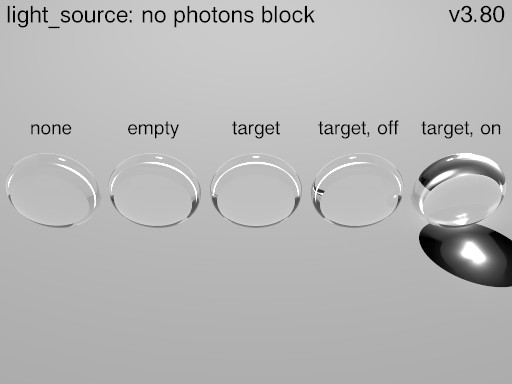
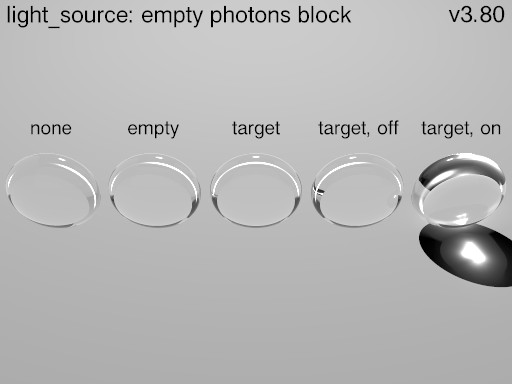
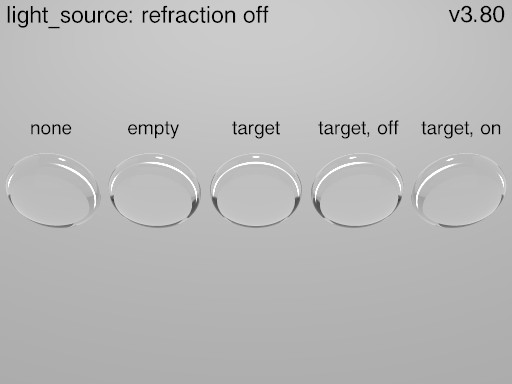
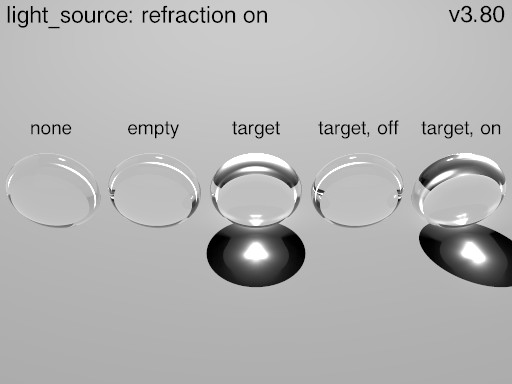
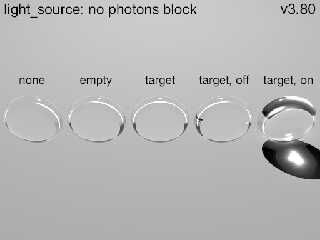
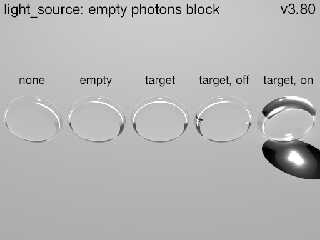
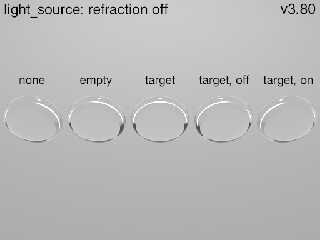
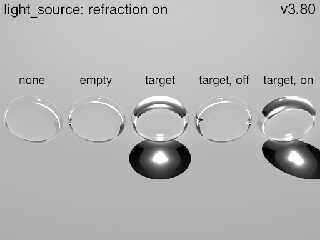
We seem to have 3 categories of scenarios:
1. With no light_source photons block or with an empty light_source
photons block, we get caustics only from explicit refraction on target
objects
2. With light_source { photons { refraction off } }, we get no caustics
from any object.
3. With light_source { photons { refraction on } }, we get caustics from
all target objects by default.
My results are the same with versions 3.5, 3.6.1, 3.7.0.10, and
3.8.0-beta.2, all on GNU/Linux.
My experience has been the same as Alain's. I only use a light_source
photons block to turn photons off.
Of course, when we add reflection, we get more permutations, but I've
never had occasion to turn one off without the other in a light_source.
none = no photons block
empty = photons { }
target = photons { target }
target, off = photons { target refraction off }
target, on = photons { target refraction on }
Post a reply to this message
Attachments:
Download 'default_photons-38-1.jpg' (24 KB)
Download 'default_photons-38-2.jpg' (24 KB)
Download 'default_photons-38-3.jpg' (21 KB)
Download 'default_photons-38-4.jpg' (25 KB)
Preview of image 'default_photons-38-1.jpg'
Preview of image 'default_photons-38-2.jpg'
Preview of image 'default_photons-38-3.jpg'
Preview of image 'default_photons-38-4.jpg'
|
|
| |
| |
|
|
|
|
| |
| |
|
|
Cousin Ricky <ric### [at] yahoo com> wrote:
>
> My results are the same with versions 3.5, 3.6.1, 3.7.0.10, and
> 3.8.0-beta.2, all on GNU/Linux.
>
So at this late date, the bigger questions are:
1) What should be done about the documentation concerning the defaults?
Given that the behavior is a complicated situation, it seems to me that the most
expedient 'fix' would be to issue a warning (of *some* kind)-- in both the docs
and during a render. Something like:
"Due to a long-standing quirk in the photons code, be aware that these default
values may be overridden and cause unexpected results. Best practice would be to
use explicit photon blocks and on/off keywords in your scenes."
2) Should an attempt even be made to correct the underlying code, to bring it
into strict compliance with the stated defaults (given that these quirks have
been around 'since the beginning of time')? Doing so might alter the outcome of
*many* older scenes. However, there are precedents for such a large change: for
example, the 'emission' keyword (and its message warning about a too-high
ambient value); and radiosity now automatically turning off 'ambient' light.
These two changes also required older scenes to be edited.
-----------
BTW:
I think that the docs' 'target' default of 1.0 also needs a small
clarification, since a numerical value is only meant to apply when 'spacing' is
used in the global photos block. Of course, the 1.0 value also works when
'count' is used instead-- but as just a Boolean operator in that case(?)-- and
incrementally changing the float value has no effect.
However, a simple 'on' can also be used, again in either case... but the docs
don't mention it.
Would these be more appropriate for the docs' default?:
target 1.0 When 'spacing' is used in the global photons block
target on When 'count' is used in the global photons block com> wrote:
>
> My results are the same with versions 3.5, 3.6.1, 3.7.0.10, and
> 3.8.0-beta.2, all on GNU/Linux.
>
So at this late date, the bigger questions are:
1) What should be done about the documentation concerning the defaults?
Given that the behavior is a complicated situation, it seems to me that the most
expedient 'fix' would be to issue a warning (of *some* kind)-- in both the docs
and during a render. Something like:
"Due to a long-standing quirk in the photons code, be aware that these default
values may be overridden and cause unexpected results. Best practice would be to
use explicit photon blocks and on/off keywords in your scenes."
2) Should an attempt even be made to correct the underlying code, to bring it
into strict compliance with the stated defaults (given that these quirks have
been around 'since the beginning of time')? Doing so might alter the outcome of
*many* older scenes. However, there are precedents for such a large change: for
example, the 'emission' keyword (and its message warning about a too-high
ambient value); and radiosity now automatically turning off 'ambient' light.
These two changes also required older scenes to be edited.
-----------
BTW:
I think that the docs' 'target' default of 1.0 also needs a small
clarification, since a numerical value is only meant to apply when 'spacing' is
used in the global photos block. Of course, the 1.0 value also works when
'count' is used instead-- but as just a Boolean operator in that case(?)-- and
incrementally changing the float value has no effect.
However, a simple 'on' can also be used, again in either case... but the docs
don't mention it.
Would these be more appropriate for the docs' default?:
target 1.0 When 'spacing' is used in the global photons block
target on When 'count' is used in the global photons block
Post a reply to this message
|
|
| |
| |
|
|
From: Alain Martel
Subject: Re: odd behavior of photon reflection/refraction defaults
Date: 9 Dec 2025 11:17:33
Message: <69384b9d$1@news.povray.org>
|
|
|
| |
| |
|
|
Le 2025-12-09 à 09:42, Kenneth a écrit :
> Cousin Ricky <ric### [at] yahoocom> wrote:
>>
>> My results are the same with versions 3.5, 3.6.1, 3.7.0.10, and
>> 3.8.0-beta.2, all on GNU/Linux.
>>
>
> So at this late date, the bigger questions are:
>
> 1) What should be done about the documentation concerning the defaults?
>
> Given that the behavior is a complicated situation, it seems to me that the most
> expedient 'fix' would be to issue a warning (of *some* kind)-- in both the docs
> and during a render. Something like:
>
> "Due to a long-standing quirk in the photons code, be aware that these default
> values may be overridden and cause unexpected results. Best practice would be to
> use explicit photon blocks and on/off keywords in your scenes."
>
> 2) Should an attempt even be made to correct the underlying code, to bring it
> into strict compliance with the stated defaults (given that these quirks have
> been around 'since the beginning of time')? Doing so might alter the outcome of
> *many* older scenes. However, there are precedents for such a large change: for
> example, the 'emission' keyword (and its message warning about a too-high
> ambient value); and radiosity now automatically turning off 'ambient' light.
> These two changes also required older scenes to be edited.
>
> -----------
> BTW:
> I think that the docs' 'target' default of 1.0 also needs a small
> clarification, since a numerical value is only meant to apply when 'spacing' is
> used in the global photos block. Of course, the 1.0 value also works when
> 'count' is used instead-- but as just a Boolean operator in that case(?)-- and
> incrementally changing the float value has no effect.
>
> However, a simple 'on' can also be used, again in either case... but the docs
> don't mention it.
>
> Would these be more appropriate for the docs' default?:
> target 1.0 When 'spacing' is used in the global photons block
> target on When 'count' is used in the global photons block
>
>
>
The value after target have an effect on the density of the photons for
the target object.
Even when using count, target 0.5 should cause that object to receive 4
times as many photons compared to target 1/on/true. When using count,
this only have an effect when there are at least two target objects.
Useful when one object is very simple, like a simple box, and the other
have a complex geometry, like a faceted gem.
Post a reply to this message
|
|
| |
| |
|
|
|
|
| |
| |
|
|
hi,
Alain Martel <kua### [at] videotronca> wrote:
> > Cousin Ricky <ric### [at] yahoocom> wrote:
> >> My results are the same with versions 3.5, 3.6.1, 3.7.0.10, and
> >> 3.8.0-beta.2, all on GNU/Linux.
> >
> > So at this late date, the bigger questions are:
> >
> > 1) What should be done about the documentation concerning the defaults?
> >
> > Given that the behavior is a complicated situation, it seems to me that the most
> > expedient 'fix' would be to issue a warning (of *some* kind)-- in both the docs
> > and during a render. Something like:
> >
> > "Due to a long-standing quirk in the photons code, be aware that these default
> > values may be overridden and cause unexpected results. Best practice would be to
> > use explicit photon blocks and on/off keywords in your scenes."
so, it all started with radmac's "Perfect Mirror" question. and looking at the
discussion since, it seems not so much about which feature(s) have which
default(s), but more about the interaction of various features when (not)
explicitly using the keywords and "qualifiers".
the documentation of photons includes both a FAQ and "Tips". so, eg, the radmac
question (rephrased perhaps) and a precis of the answer/issues, could make a
"fine" entry in the FAQ, and a new Tip could be added wrt explicit use of
keywords (or "why not to rely on defaults" :-)).
> > 2) Should an attempt even be made to correct the underlying code, to bring it
> > into strict compliance with the stated defaults (given that these quirks have
> > been around 'since the beginning of time')? Doing so might alter the outcome of
> > *many* older scenes. However, there are precedents for such a large change: for
> > example, the 'emission' keyword (and its message warning about a too-high
> > ambient value); and radiosity now automatically turning off 'ambient' light.
> > These two changes also required older scenes to be edited.
no :-). an addendum (addenda, really) to the documentation would be my
preference.
> > BTW:
> > I think that the docs' 'target' default of 1.0 also needs a small
> > clarification, since a numerical value is only meant to apply when 'spacing' is
> > used in the global photos block. Of course, the 1.0 value also works when
> > 'count' is used instead-- but as just a Boolean operator in that case(?)-- and
> > incrementally changing the float value has no effect.
> >
> > However, a simple 'on' can also be used, again in either case... but the docs
> > don't mention it.
well, 'target [float]' is documented. it would be nice if a future parser/SDL
was free from those aspects.
> > Would these be more appropriate for the docs' default?:
> > target 1.0 When 'spacing' is used in the global photons block
> > target on When 'count' is used in the global photons block
why 'on' ?? (do you actually want to add further "ambiguities" to the parsing ?
:-))
> The value after target have an effect on the density of the photons for
> the target object.
>
> Even when using count, target 0.5 should cause that object to receive 4
> times as many photons compared to target 1/on/true. When using count,
> this only have an effect when there are at least two target objects.
>
> Useful when one object is very simple, like a simple box, and the other
> have a complex geometry, like a faceted gem.
am open to, and interested in, concrete suggestions to improve the photon
documentation, wrt the "interplay" of features, and all touched on in these two
threads; posted here or sent (pls use "helpful" subject line ;-)).
regards, jr.
Post a reply to this message
|
|
| |
| |
|
|
|
|
| |
| |
|
|
"jr" <cre### [at] gmailcom> wrote:
> am open to, and interested in, concrete suggestions to improve the photon
> documentation, wrt the "interplay" of features, and all touched on in these two
> threads; posted here or sent (pls use "helpful" subject line ;-)).
The best thing, IMHO, is for someone knowledgeable in the area, or who has the
patience and tenacity to work it out - to write a script / macro whatever -
that takes the user input and properly outputs what will happen.
An accurate flowchart is a lot better than written documentation that has to be
interpreted.
In this case where there seems to be a lot of if/then/else, then a few lines of
code is worth 10 pages of documentation that the user still has to read,
interpret, comprehend, and then implement in their own code.
Don't document it. Write the code to DO the thing. Then anyone can understand
it, or barring that, make practical use of it.
- BE
Post a reply to this message
|
|
| |
| |
|
|
|
|
| |
| |
|
|
"jr" <cre### [at] gmailcom> wrote:
>
> > > [Kenneth wrote:]
> > > Would these be more appropriate for the docs' default?:
> > > target 1.0 When 'spacing' is used in the global photons block
> > > target on When 'count' is used in the global photons block
>
> why 'on' ??
> (do you actually want to add further "ambiguities" to the parsing ?)
"jr" <cre### [at] gmailcom> wrote:
>
> > > Kenneth wrote:]
> > > Would these be more appropriate for the docs' default?:
> > > target 1.0 When 'spacing' is used in the global photons block
> > > target on When 'count' is used in the global photons block
>
> why 'on' ??
> (do you actually want to add further "ambiguities" to the parsing ?
Sorry to say that I did not do much testing of 'target' behavior until now-- and
it is also a bit confusing to me.
Given that the docs say that the default for an object is 'target 1.0'-- which
should mean ON as I understand it (when *either* 'count' or 'spacing' is used in
the global photons block, both of which I tested) -- here are my current
parse/render results in both 3.7 and 3.8 beta 1. I used my test code posted
earlier.
photons{} -- an empty photon block-- the default for 'target' is actually OFF,
not ON.
With NO photons block in an object, the default is likewise OFF, not ON.
photons{target} -- neither 1.0 nor ON explicitly stated-- the object *is* a
photon target, as expected from the explicit use of the keyword
photons{target 1.0} or photons{target on} -- likewise ON as expected.
So it seems that the target default is OFF for an object-- unless I am
completely mistaken as the what 'default of target 1.0' means in the docs (other
than as an explicit 'spacing divisor').
Post a reply to this message
|
|
| |
| |
|
|
|
|
| |
| |
|
|
hi,
"Kenneth" <kdw### [at] gmailcom> wrote:
> "jr" <cre### [at] gmailcom> wrote:
> > > > Kenneth wrote:]
> > > > Would these be more appropriate for the docs' default?:
> > > > target 1.0 When 'spacing' is used in the global photons block
> > > > target on When 'count' is used in the global photons block
> >
> > why 'on' ??
> > (do you actually want to add further "ambiguities" to the parsing ?
>
> Sorry to say that I did not do much testing of 'target' behavior until now-- and
> it is also a bit confusing to me.
>
> Given that the docs say that the default for an object is 'target 1.0'-- which
> should mean ON as I understand it (when *either* 'count' or 'spacing' is used ...
"The keyword target makes this object a target." note, keyword alone.
<wiki.povray.org/content/Reference:Photons#Photon_Global_Settings>
as I wrote, the syntax diagram says 'target [float]', a value of '1.0' simply
ensures (I think) that "nothing changes" by default wrt photon spacing.
> ...
> So it seems that the target default is OFF for an object-- unless I am
> completely mistaken as the what 'default of target 1.0' means in the docs (other
> than as an explicit 'spacing divisor').
there isn't a photons "default" either w/out corresponding block, iiuc. unsure
how 'collect' plays with 'target', but, again aiui, 'refraction' and
'reflection' do not require the object to be a target.
also, fwiw, the documentation calls it a "spacing multiplier", rather than
"divisor". luckily, with '1.0', no difference :-).
regards, jr.
Post a reply to this message
|
|
| |
| |
|
|
|
|
| |
| |
|
|
"jr" <cre### [at] gmailcom> wrote:
>
> "The keyword target makes this object a target." note, keyword alone.
> <wiki.povray.org/content/Reference:Photons#Photon_Global_Settings>
You're right about that. Although-- at the risk of sounding pedantic-- the
'default' block in the docs does not actually state it in an immediately useful
way. Instead, the only given default for target is 'target 1.0'. In my ideal
world, I wish it was clearer:
target: OFF when no explicit target keyword is specified
target spacing: 1.0
>
> as I wrote, the syntax diagram says 'target [float]', a value of '1.0' simply
> ensures (I think) that "nothing changes" by default wrt photon spacing.
Yes, that's my understanding as well, and tests confirm it.
> but, again aiui, 'refraction' and
> 'reflection' do not require the object to be a target.
Actually, an explicit 'target' *is* required (if my tests are any indication.)
In my test code earlier, in the photon blocks, use 'refraction on' in both the
light_source and the translucent box. Then comment-out 'target' in the
translucent box. The result: no refraction effects.
>
> also, fwiw, the documentation calls it a "spacing multiplier", rather than
> "divisor". luckily, with '1.0', no difference :-).
>
Ah, yes, you're correct. I was thinking in terms of 'number' of photons rather
than spacing:
target 0.5-- the spacing between photons is reduced by half...whereas the number
of photons is...either doubled or quadrupled(?)-- like spacing/2
(or spacing/4 ?)
Sorry for the confusion.
Post a reply to this message
|
|
| |
| |
|
|
|
|
| |
| |
|
|
I had a window of time today, and set The AI to work on this.
I have diagrams and charts and flowcharts and code.
Still need to go through it all and test it out.
I can post or forward the zips if you'd like.
- BE
Post a reply to this message
|
|
| |
| |
|
|
|
|
| |
|
|