|
|
|
|
|
|
| |
| |
|
|
|
|
| |
| |
|
|
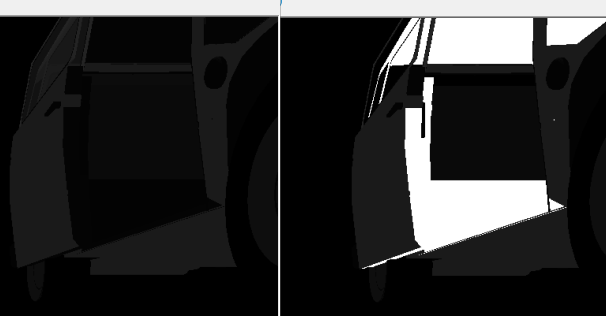
I am working at my parser, but I got two different results.
example :
triangle{<3.2475,.9143,6.0001><3.4358,.9376,5.9847><3.2475,.9376,6.0047>
pigment{color rgb<255/255,63/255,0/255>}}
triangle{<3.2475,.9143,6.0001><3.4358,.9376,5.9847><3.2475,.9376,6.0047>
pigment{color rgb<1,63/255,0>}}
but is mathematics an opinion? (ver. 3.7)
many thaks if someone help me to understand!
Post a reply to this message
Attachments:
Download 'clipboard01.png' (19 KB)
Preview of image 'clipboard01.png'
|
|
| |
| |
|
|
|
|
| |
| |
|
|
"GioSeregni" <gms### [at] hotmail com> wrote:
> triangle{<3.2475,.9143,6.0001><3.4358,.9376,5.9847><3.2475,.9376,6.0047>
> pigment{color rgb<255/255,63/255,0/255>}}
>
> triangle{<3.2475,.9143,6.0001><3.4358,.9376,5.9847><3.2475,.9376,6.0047>
> pigment{color rgb<1,63/255,0>}}
This is VERY interesting Gio.
Apparently the color keyword applies gamma handling,
but using just rgb is linear color.
Remove the color keyword and see if the colors are the same.
I'd also be interested to see what happens if you do your multiplication first.
#declare Color = <255/255,63/255,0/255>;
pigment{color rgb Color}}
I guess "color" triggers legacy gamma correction rules, which exists for
backwards compatibility.
- BE
gamma‑encoded color values, applying the scene gamma correction rules.
And: com> wrote:
> triangle{<3.2475,.9143,6.0001><3.4358,.9376,5.9847><3.2475,.9376,6.0047>
> pigment{color rgb<255/255,63/255,0/255>}}
>
> triangle{<3.2475,.9143,6.0001><3.4358,.9376,5.9847><3.2475,.9376,6.0047>
> pigment{color rgb<1,63/255,0>}}
This is VERY interesting Gio.
Apparently the color keyword applies gamma handling,
but using just rgb is linear color.
Remove the color keyword and see if the colors are the same.
I'd also be interested to see what happens if you do your multiplication first.
#declare Color = <255/255,63/255,0/255>;
pigment{color rgb Color}}
I guess "color" triggers legacy gamma correction rules, which exists for
backwards compatibility.
- BE
gamma‑encoded color values, applying the scene gamma correction rules.
And:
Post a reply to this message
|
|
| |
| |
|
|
|
|
| |
| |
|
|
"Bald Eagle" <cre### [at] netscapenet> wrote:
> "GioSeregni" <gms### [at] hotmailcom> wrote:
>
> > triangle{<3.2475,.9143,6.0001><3.4358,.9376,5.9847><3.2475,.9376,6.0047>
> > pigment{color rgb<255/255,63/255,0/255>}}
> >
> > triangle{<3.2475,.9143,6.0001><3.4358,.9376,5.9847><3.2475,.9376,6.0047>
> > pigment{color rgb<1,63/255,0>}}
>
> This is VERY interesting Gio.
>
> Apparently the color keyword applies gamma handling,
> but using just rgb is linear color.
>
> Remove the color keyword and see if the colors are the same.
>
> I'd also be interested to see what happens if you do your multiplication first.
> #declare Color = <255/255,63/255,0/255>;
> pigment{color rgb Color}}
>
> I guess "color" triggers legacy gamma correction rules, which exists for
> backwards compatibility.
>
> - BE
>
>
> gamma‑encoded color values, applying the scene gamma correction rules.
>
>
> And:
>
>
Thanks for the suggestion.
I'm upgrading my POV-STL-CAD translator from 32 to 64 bit, and I realized that
before translating the pov files I need to normalize all the various syntax
expressions I used in my POV and INC files.
If I don't standardize the syntax, compiling the database for exports the
entities will become a very complicated mess.
I'll try what you suggest...
Post a reply to this message
|
|
| |
| |
|
|
|
|
| |
| |
|
|
mmmm... it seems not working again
it's possible that in the same vector <nnn,nnn,nnn> the elements cannot to be a
mix of integer and float (nnn/nnn)
Post a reply to this message
|
|
| |
| |
|
|
|
|
| |
| |
|
|
hi,
"GioSeregni" <gms### [at] hotmailcom> wrote:
> mmmm... it seems not working again
> it's possible that in the same vector <nnn,nnn,nnn> the elements cannot to be a
> mix of integer and float (nnn/nnn)
to POV-Ray an "integer" is the same as a float, without decimal point & digits,
"Where POV-Ray needs an integer value it allows you to specify a float value and
it truncates it to an integer".
<wiki.povray.org/content/Reference:Numeric_Expressions>
regards, jr.
Post a reply to this message
|
|
| |
| |
|
|
From: Cousin Ricky
Subject: Re: question about same code(?) and different render
Date: 21 Mar 2026 11:39:03
Message: <69bebb97$1@news.povray.org>
|
|
|
| |
| |
|
|
On 2026-03-20 08:10 (-4), Bald Eagle wrote:
> "GioSeregni" <gms### [at] hotmailcom> wrote:
>
>> triangle{<3.2475,.9143,6.0001><3.4358,.9376,5.9847><3.2475,.9376,6.0047>
>> pigment{color rgb<255/255,63/255,0/255>}}
>>
>> triangle{<3.2475,.9143,6.0001><3.4358,.9376,5.9847><3.2475,.9376,6.0047>
>> pigment{color rgb<1,63/255,0>}}
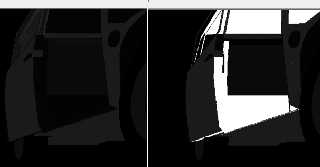
I'm confused. Both colors specifications should be orange, but I see no
orange in the images. The only difference I see is areas that are black
on the left and white on the right, and that does not look like a gamma
issue.
It would help if we had more context for this code. When I incorporated
the triangles in a scene, they both were the expected orange.
> This is VERY interesting Gio.
>
> Apparently the color keyword applies gamma handling,
> but using just rgb is linear color.
>
> Remove the color keyword and see if the colors are the same.
>
> I'd also be interested to see what happens if you do your multiplication first.
> #declare Color = <255/255,63/255,0/255>;
> pigment{color rgb Color}}
>
> I guess "color" triggers legacy gamma correction rules, which exists for
> backwards compatibility.
>
> - BE
>
> “The color keyword causes POV‑Ray to treat the given RGB values as
> gamma‑encoded color values, applying the scene gamma correction rules.
> The plain rgb keyword specifies linear RGB values.”
>
> And:
>
> “The color keyword is deprecated and should be avoided in new scenes.”
Whoa, this is news to me! Where is this in the documentation?
This has implications for macros that force promotion on its arguments
or that return vectors to be used as colors. Sometimes the only way to
avoid a parse warning or parse error is to use the color keyword.
Post a reply to this message
|
|
| |
| |
|
|
|
|
| |
| |
|
|
Thank to all!
I'm sorry for wasting your time
I accidentally found the source of the problem. It must have happened while
using my compression routine to remove unnecessary white space. I couldn't
replicate the error; when I used it on a very large file, it gave the same
error. Suspended... for now.
Sorry again !
Post a reply to this message
|
|
| |
| |
|
|
|
|
| |
| |
|
|
Cousin Ricky <ric### [at] yahoocom> wrote:
> Whoa, this is news to me! Where is this in the documentation?
> This has implications for macros that force promotion on its arguments
> or that return vectors to be used as colors. Sometimes the only way to
> avoid a parse warning or parse error is to use the color keyword.
Yeah, this is what happens when I get too little sleep and try to wrangle things
with a search engine while I'm doing 8 other things at the same time have and no
direct access to povray so I can run test code.
It didn't seem right - especially due to the vector promotion thing, but I just
plowed right through that and didn't listen to "the little voice".
What a gaffe. Someone delete this. :O
- BE
Post a reply to this message
|
|
| |
| |
|
|
|
|
| |
|
|