|
|
|
|
|
|
| |
| |
|
|
|
|
| |
| |
|
|
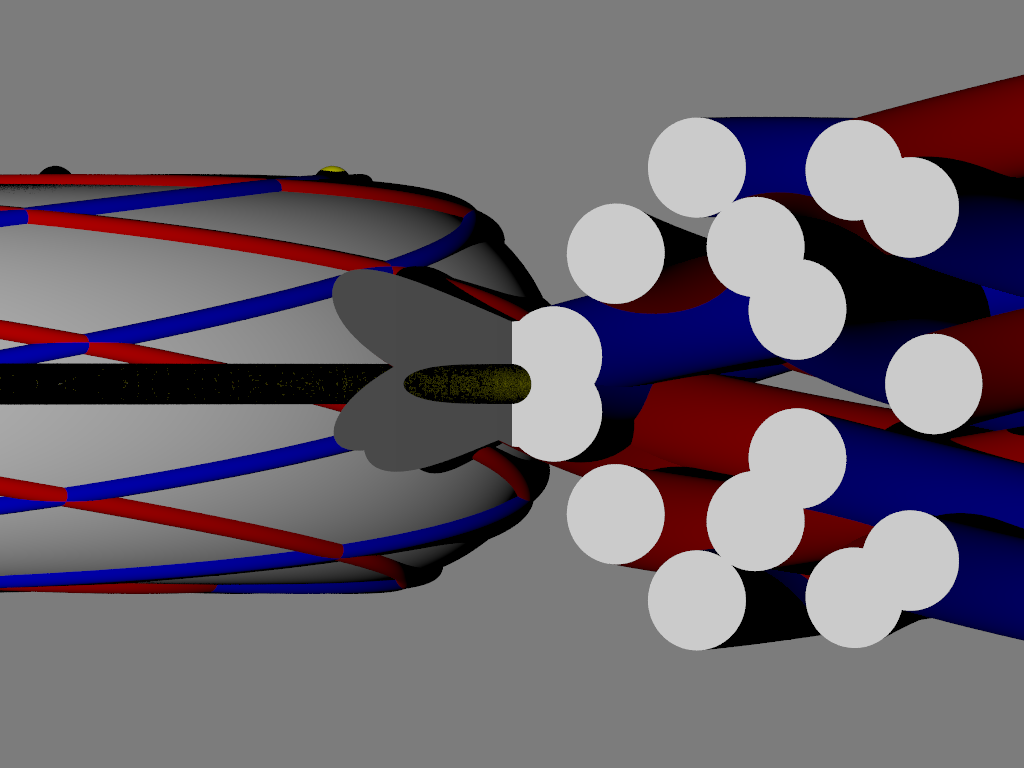
I am working on a scene to establish geometry for conversion to OpenSCAD.
I'm super close, but when I zoomed in to closely inspect how things were
positioned, I noticed that some objects simply weren't being properly lit.
Adding emission only partially remedied the situation.
The objects are all just a simple torus {} with plain rgb pigments.
But for some reason the yellow torus is the only one really affected.
Lights are just point lights.
Lit from the front with no obvious occlusion.
Adding a top light doesn't help.
The shadows are really weird too.
3.8 beta 2
Any ideas?
- BE
Post a reply to this message
Attachments:
Download 'dupincyclide_3dprint.png' (118 KB)
Preview of image 'dupincyclide_3dprint.png'
|
|
| |
| |
|
|
From: William F Pokorny
Subject: Re: Inexplicably bad lighting in otherwise simple scene
Date: 19 Feb 2026 15:11:50
Message: <69976e86$1@news.povray.org>
|
|
|
| |
| |
|
|
On 2/19/26 07:05, Bald Eagle wrote:
> Any ideas?
Guesses.
Some of what I see in your image can happen when the plane of the camera
slices into shapes like the torus{}.
That 'emission 1' didn't help much and that you have some apparent
speckling looks more like solver issues - which could be related to
geometry of the scene for the image posted and/or the state of the
'solver code' itself.
Are you using an orthographic camera?
With the camera set up you have, how are you zooming?
Have you tried with both 'sturm' and not? If so, are there differences
in result?
A wilder guess. The ray->surface intersection equations for the torus
adjust each rays origin prior to creating the equation for the
solver(s). The origin adjustments are unrolled after roots are found so
as to get the real intersection positions. It's known that ray origin
adjustment works less well at larger torus dimensions once the equation
origin is beyond the first surface.
Bill P.
Post a reply to this message
|
|
| |
| |
|
|
|
|
| |
| |
|
|
William F Pokorny <ano### [at] anonymous org> wrote:
> On 2/19/26 07:05, Bald Eagle wrote:
> > Any ideas?
>
> Guesses.
>
> Some of what I see in your image can happen when the plane of the camera
> slices into shapes like the torus{}.
>
> That 'emission 1' didn't help much and that you have some apparent
> speckling looks more like solver issues - which could be related to
> geometry of the scene for the image posted and/or the state of the
> 'solver code' itself.
Could be.
The other weird thing is that the yellow torus was not only speckled - but it
was partially transparent as well.
I've seen and mentioned this before in other scenes.
>
> Are you using an orthographic camera?
>
> With the camera set up you have, how are you zooming?
Yes. Luckily I emailed myself the scene, so I can reference it.
#declare Zoom = 0.4;
camera {
orthographic
location <IR*1.5, 0, -2*IR>
location <IR, 5*M, -2*IR>
//location <IR, 5*M, 0>
right x*image_width/Zoom
up y*image_height/Zoom
look_at <IR, 0, 0>
}
>
> Have you tried with both 'sturm' and not? If so, are there differences
> in result?
I didn't yet - but have thought about doing so.
>
> A wilder guess. The ray->surface intersection equations for the torus
> adjust each rays origin prior to creating the equation for the
> solver(s). The origin adjustments are unrolled after roots are found so
> as to get the real intersection positions. It's known that ray origin
> adjustment works less well at larger torus dimensions once the equation
> origin is beyond the first surface.
It's a 150-unit torus.
#declare M = 150;
#declare m = 20;
.....
torus {M, m pigment {rgb 1} translate T_Center}
I'll try perspective and maybe sturm when I get back in.
The really puzzling thing about it, is that all of the other tori render just
fine.
- BE org> wrote:
> On 2/19/26 07:05, Bald Eagle wrote:
> > Any ideas?
>
> Guesses.
>
> Some of what I see in your image can happen when the plane of the camera
> slices into shapes like the torus{}.
>
> That 'emission 1' didn't help much and that you have some apparent
> speckling looks more like solver issues - which could be related to
> geometry of the scene for the image posted and/or the state of the
> 'solver code' itself.
Could be.
The other weird thing is that the yellow torus was not only speckled - but it
was partially transparent as well.
I've seen and mentioned this before in other scenes.
>
> Are you using an orthographic camera?
>
> With the camera set up you have, how are you zooming?
Yes. Luckily I emailed myself the scene, so I can reference it.
#declare Zoom = 0.4;
camera {
orthographic
location <IR*1.5, 0, -2*IR>
location <IR, 5*M, -2*IR>
//location <IR, 5*M, 0>
right x*image_width/Zoom
up y*image_height/Zoom
look_at <IR, 0, 0>
}
>
> Have you tried with both 'sturm' and not? If so, are there differences
> in result?
I didn't yet - but have thought about doing so.
>
> A wilder guess. The ray->surface intersection equations for the torus
> adjust each rays origin prior to creating the equation for the
> solver(s). The origin adjustments are unrolled after roots are found so
> as to get the real intersection positions. It's known that ray origin
> adjustment works less well at larger torus dimensions once the equation
> origin is beyond the first surface.
It's a 150-unit torus.
#declare M = 150;
#declare m = 20;
.....
torus {M, m pigment {rgb 1} translate T_Center}
I'll try perspective and maybe sturm when I get back in.
The really puzzling thing about it, is that all of the other tori render just
fine.
- BE
Post a reply to this message
|
|
| |
| |
|
|
|
|
| |
| |
|
|
"Bald Eagle" <cre### [at] netscapenet> wrote:
> I'll try perspective and maybe sturm when I get back in.
> The really puzzling thing about it, is that all of the other tori render just
> fine.
Changing to perspective helped - but there was still a thin line of cruft around
the perimeter.
Sturm didn't do much to remedy that, but shifting the camera up a little bit
did.
The shadows still look weird.
- BE
Post a reply to this message
|
|
| |
| |
|
|
From: William F Pokorny
Subject: Re: Inexplicably bad lighting in otherwise simple scene
Date: 20 Feb 2026 05:25:59
Message: <699836b7$1@news.povray.org>
|
|
|
| |
| |
|
|
On 2/19/26 19:18, Bald Eagle wrote:
> "Bald Eagle" <cre### [at] netscapenet> wrote:
>
>> I'll try perspective and maybe sturm when I get back in.
>> The really puzzling thing about it, is that all of the other tori render just
>> fine.
>
> Changing to perspective helped - but there was still a thin line of cruft around
> the perimeter.
> Sturm didn't do much to remedy that, but shifting the camera up a little bit
> did.
>
> The shadows still look weird.
>
On the shadows.
First a disclaimer. In not completely understanding the geometry of your
scene, seeing what you see as wrong about your shadows is not completely
clear.
That said, one of the things which can happen is that the shadow test
rays can resolve to surfaces different than do the camera rays.
For example, sometime last year I posted about the sor example used in
our documentation being problematic for our solvers - especially those
in the official POV-Ray releases. There were cases there where shadow
test rays in some set ups were causing solver problems while those from
the camera were OK.
I'll also mention the 2.5 issues in the shadow cache mechanism of
official POV-Ray releases which are fixed in the yuqk fork. Those shadow
cache issues can cause strange shadow artifacts - depending on 'stuff'.
I'm busy today, but I'll put on my todo list testing with your
orthographic camera(*) and zoom set up. My generic orthographic camera
set up is somewhat different.
Aside: An interesting test would be to replace the torus{} shapes with
isosurface f_torus() shapes. The isosurface mechanism (so long as the
max gradient is large enough for all ray approaches) is often more
robust / stable with respect to resolving surfaces from varied ray
approaches.
Bill P.
Post a reply to this message
|
|
| |
| |
|
|
|
|
| |