 |
|
|
|
|
|
| |
| |
|
|
|
|
| |
| |
|
|
"nemesis" <nam### [at] gmail com> wrote:
> Nicolas Alvarez <nic### [at] gmailisthebestcom> wrote:
> > Inkscape is good at making SVG files.
>
> and that's great! Since SVG is a text format, exporting to a handful of other
> formats is trivial. alphaQuad says the povray export isn't perfect, but his
> rendering shows the same line artifacts as the "defective" inkscape export.
I was going to say something but thought it obvious.
"the same line artifacts" are correct renders not artifacts; shown by the bezier
graph. The slightest curve in glass focuses the light as opposed to the left,red
glass with nodes just moved down (and other cups with a straight surface).
>
> Besides, inkscape is far, far more than simply an SVG writer. It's got one of
> the best, smoothiest curve drawing controls I've ever witnessed and is fully
> multiplatform and open-source. The source is available for the brave souls who
> want it ported to old or alien platforms...
>
> > Like this one, with realtime preview and all.
> > http://www.2writers.com/Eddie/LatheSor.htm
>
> that realtime preview with so few tesselated polygons hardly shows how the real
> povray bezier_spline lathe will end up. Probably, with line artifacts... com> wrote:
> Nicolas Alvarez <nic### [at] gmailisthebestcom> wrote:
> > Inkscape is good at making SVG files.
>
> and that's great! Since SVG is a text format, exporting to a handful of other
> formats is trivial. alphaQuad says the povray export isn't perfect, but his
> rendering shows the same line artifacts as the "defective" inkscape export.
I was going to say something but thought it obvious.
"the same line artifacts" are correct renders not artifacts; shown by the bezier
graph. The slightest curve in glass focuses the light as opposed to the left,red
glass with nodes just moved down (and other cups with a straight surface).
>
> Besides, inkscape is far, far more than simply an SVG writer. It's got one of
> the best, smoothiest curve drawing controls I've ever witnessed and is fully
> multiplatform and open-source. The source is available for the brave souls who
> want it ported to old or alien platforms...
>
> > Like this one, with realtime preview and all.
> > http://www.2writers.com/Eddie/LatheSor.htm
>
> that realtime preview with so few tesselated polygons hardly shows how the real
> povray bezier_spline lathe will end up. Probably, with line artifacts...
Post a reply to this message
|
|
| |
| |
|
|
|
|
| |
| |
|
|
"alphaQuad" <alp### [at] earthlinknet> wrote:
> "the same line artifacts" are correct renders not artifacts; shown by the bezier
> graph. The slightest curve in glass focuses the light as opposed to the left,red
> glass with nodes just moved down (and other cups with a straight surface).
well, the curves are very smooth in the 2D editors, but in povray the transition
is much too visible no matter how much you tweak it. That's my point: povray
smoother.
packages, not cubic spline...
Post a reply to this message
|
|
| |
| |
|
|
|
|
| |
| |
|
|
"nemesis" <nam### [at] gmailcom> wrote:
> "alphaQuad" <alp### [at] earthlinknet> wrote:
> > "the same line artifacts" are correct renders not artifacts; shown by the bezier
> > graph. The slightest curve in glass focuses the light as opposed to the left,red
> > glass with nodes just moved down (and other cups with a straight surface).
>
> well, the curves are very smooth in the 2D editors, but in povray the transition
> is much too visible no matter how much you tweak it. That's my point: povray
> smoother.
>
> packages, not cubic spline...
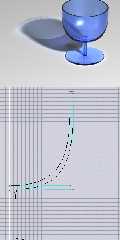
tweaking .....
picture is worth a thousand words .... just one segment per curve.
I just need to write some 10 more features to get there.
but manual tuning (drag and drop at scale) is pratical.
#declare smoothcup = lathe { bezier_spline
32,
<0,2.857183>,<116.103892,2.857183>,<229.870133,4.675365>,<266.233769,2.857183>,
<266.233769,2.857183>,<275.324678,6.493547>,<280.519479,9.870156>,<264.935066,14.285684>,
<264.935066,14.285684>,<232.987017,27.79222>,<71.948049,25.714283>,<30.129867,42.07792>,
<30.129867,42.07792>,<30.129867,62.077921>,<25.714291,267.272729>,<38.701298,283.896097>,
<38.701298,283.896097>,<318.961042,282.337659>,<320.223666,503.708508>,<317.662339,763.37662>,
<317.662339,763.37662>,<310.909091,765.974025>,<308.571431,769.090908>,<301.818182,763.116884>,
<301.818182,763.116884>,<307.792207,500.779213>,<303.896107,303.376623>,<0,300.259738>,
<0,300.259738>,<2.077925,278.961065>,<8.311688,28.311728>,<0,2.857183>
scale 1/900
}
Post a reply to this message
Attachments:
Download 'smoothcup.jpg' (72 KB)
Preview of image 'smoothcup.jpg'
|
|
| |
| |
|
|
|
|
| |
| |
|
|
"alphaQuad" <alp### [at] earthlinknet> wrote:
> tweaking .....
>
> picture is worth a thousand words .... just one segment per curve.
hmm. I call that "cheating". ;)
what if you wanted the cup body to be more curvy, with 2 segments? Line
artifacts are inevitable...
Post a reply to this message
|
|
| |
| |
|
|
|
|
| |
| |
|
|
"nemesis" <nam### [at] gmailcom> wrote:
> "alphaQuad" <alp### [at] earthlinknet> wrote:
> > tweaking .....
> >
> > picture is worth a thousand words .... just one segment per curve.
>
> hmm. I call that "cheating". ;)
>
> what if you wanted the cup body to be more curvy, with 2 segments? Line
> artifacts are inevitable...
Read in vase1 from vase.pov, which had 18 segments. Deleted 3.
#declare vase2 = lathe { bezier_spline
60,
<0,1.738281>,<13.083495,1.055169>,<50.65465,1.738281>,<65,1.738281>,
<65,1.738281>,<70.806451,1.396725>,<75,1.515183>,<75,6.060883>,
<75,6.060883>,<75,10.606583>,<70.205602,14.647183>,<75.761441,19.192883>,
<75.761441,19.192883>,<110.289787,41.122087>,<120.960641,82.116836>,<121.938237,115.043616>,
<121.938237,115.043616>,<122.378198,158.973988>,<78.047305,205.573516>,<52.024327,246.225187>,
<52.024327,246.225187>,<36.049139,268.848194>,<41.70118,297.425137>,<48.338574,312.312154>,
<48.338574,312.312154>,<53.649802,328.27445>,<74.540584,345.03571>,<83.989847,352.03816>,
<83.989847,352.03816>,<89.921283,357.6913>,<94.89046,368.18094>,<87.378195,370>,
<87.378195,370>,<79.296975,371.23106>,<70.820413,359.97291>,<64.144687,356.4137>,
<64.144687,356.4137>,<54.043162,351.02801>,<35.984247,334.784946>,<30.537635,313.924731>,
<30.537635,313.924731>,<26.703926,300.591398>,<15.168654,268.697748>,<33.224168,238.735738>,
<33.224168,238.735738>,<58.755929,198.081274>,<100.849624,149.188788>,<100.575295,114.360134>,
<100.575295,114.360134>,<100.759266,82.279284>,<94.646315,55.586889>,<61.114229,25.253783>,
<61.114229,25.253783>,<55.454314,22.728483>,<20.575585,17.738756>,<0,14.999983>,
<0,14.999983>,<0.170779,9.756466>,<0,6.627592>,<0,1.738281>
scale 1/200
}
Really think I need a func to set handles in opposite vectors
And a handle lock.
So far:
Drag section zoom
Move handles
Move nodes
Add/Delete node
Read/Write pov
Read svg
Artifacts? Is this cheating?
OK, who is going to put flowers in it?
Post a reply to this message
Attachments:
Download 'vase2.jpg' (118 KB)
Preview of image 'vase2.jpg'

|
|
| |
| |
|
|
|
|
| |
| |
|
|
#declare vase3 = lathe { bezier_spline
60,
<0,1.738281>,<13.083495,1.055169>,<50.65465,1.738281>,<65,1.738281>,
<65,1.738281>,<70.806451,1.396725>,<75,1.515183>,<75,6.060883>,
<75,6.060883>,<75,10.606583>,<70.205602,14.647183>,<75.761441,19.192883>,
<75.761441,19.192883>,<110.289787,41.122087>,<99.870143,90.586982>,<121.938237,115.043616>,
<121.938237,115.043616>,<161.578182,158.973988>,<29.370052,203.604319>,<52.024327,246.225187>,
<52.024327,246.225187>,<64.049128,268.848194>,<41.70118,297.425137>,<48.338574,312.312154>,
<48.338574,312.312154>,<53.649802,328.27445>,<74.540584,345.03571>,<83.989847,352.03816>,
<83.989847,352.03816>,<89.921283,357.6913>,<94.89046,368.18094>,<87.378195,370>,
<87.378195,370>,<79.296975,371.23106>,<70.820413,359.97291>,<64.144687,356.4137>,
<64.144687,356.4137>,<54.043162,351.02801>,<35.984247,334.784946>,<30.537635,313.924731>,
<30.537635,313.924731>,<26.703926,300.591398>,<48.76864,266.831082>,<33.224168,238.735738>,
<33.224168,238.735738>,<9.983195,196.729612>,<136.316276,156.655452>,<100.575295,114.360134>,
<100.575295,114.360134>,<79.868569,89.856129>,<94.646315,55.586889>,<61.114229,25.253783>,
<61.114229,25.253783>,<55.454314,22.728483>,<20.575585,17.738756>,<0,14.999983>,
<0,14.999983>,<0.170779,9.756466>,<0,6.627592>,<0,1.738281>
scale 1/200
}
Vase3: self explanatory
got alignhandle and locked movement now.
Post a reply to this message
Attachments:
Download 'vase3.jpg' (152 KB)
Preview of image 'vase3.jpg'

|
|
| |
| |
|
|
|
|
| |
| |
|
|
My mistake was that I forgot to allow 'e' the second time I wrote the binary
reader. So it would have properly read the file like this:
#declare vase3 = lathe { bezier_spline
60,
<0,-0.000017>,<18.436071,-0.18687>,<57.822473,-0.194004>,<65,-0.000017>,
<65,-0.000017>,<72.371514,0.969919>,<75,1.515183>,<75,6.060883>,
<75,6.060883>,<75,10.606583>,<70.205602,14.647183>,<75.761441,19.192883>,
<75.761441,19.192883>,<110.289787,41.122087>,<99.870143,90.586982>,<121.938237,115.043616>,
<121.938237,115.043616>,<161.578182,158.973988>,<29.370052,203.604319>,<52.024327,246.225187>,
<52.024327,246.225187>,<64.049128,268.848194>,<41.70118,297.425137>,<48.338574,312.312154>,
<48.338574,312.312154>,<53.649802,328.27445>,<74.540584,345.03571>,<83.989847,352.03816>,
<83.989847,352.03816>,<89.921283,357.6913>,<94.89046,368.18094>,<87.378195,370>,
<87.378195,370>,<79.296975,371.23106>,<70.820413,359.97291>,<64.144687,356.4137>,
<64.144687,356.4137>,<54.043162,351.02801>,<35.984247,334.784946>,<30.537635,313.924731>,
<30.537635,313.924731>,<26.703926,300.591398>,<48.76864,266.831082>,<33.224168,238.735738>,
<33.224168,238.735738>,<9.983195,196.729612>,<136.316276,156.655452>,<100.575295,114.360134>,
<100.575295,114.360134>,<79.868569,89.856129>,<94.646315,55.586889>,<61.114229,25.253783>,
<61.114229,25.253783>,<55.454314,22.728483>,<20.575585,17.738756>,<0,14.999983>,
<0,14.999983>,<0.193987,10.732264>,<0.193987,7.953459>,<0,-0.000017>
scale 1/200
}
placing bottom of vase 0.000017 * 1/200 below a zero surface (-0.000000085)
Post a reply to this message
|
|
| |
| |
|
|
|
|
| |
| |
|
|
ok, man! nice! keep it up!
good to see my "waste of time" thread resulted in something truly useful. :)
Post a reply to this message
|
|
| |
| |
|
|
|
|
| |
| |
|
|
"nemesis" <nam### [at] gmailcom> wrote:
> ok, man! nice! keep it up!
>
> good to see my "waste of time" thread resulted in something truly useful. :)
OK
Wondering what an open spline might look like, left spline open.
Looks like it contains water maybe?
Post a reply to this message
Attachments:
Download 'vaseopen.png' (155 KB)
Preview of image 'vaseopen.png'

|
|
| |
| |
|
|
|
|
| |
| |
|
|
alphaQuad wrote:
> Looks like it contains water maybe?
more like a bottle with glass by the middle? ;)
Post a reply to this message
|
|
| |
| |
|
|
|
|
| |
|
|








