|
 |
"Bald Eagle" <cre### [at] netscape net> wrote:
> A little coding or math trick.
Writing functions for a pigment {function {}} pattern with a scalar-only
function parser / VM can be painful.
For every vector, I need to evaluate 3 separate functions for each component,
and then when I need to daisy-chain functions together, that multiplies at every
step.
So one of the things I have come up with that makes this a little easier is to
extract the component that I need from the vector, and use select () to choose
which equation I need to evaluate based on a nice little operation.
select is a nice little function that gives me a way to use different equations
given the sign of some variable.
The easy way to remember this is to write select (N, -1, 0, 1).
Depending on the sign of N, I get the sign as the result.
You can put whatever you want in place of the sign when actually using this
mnemonic in practice.
To choose what equation you want would require you to remember that the pattern
is x=-1, y=0, and z=+1
But that's one more thing to forget, so we can make use of the dot product to
generate those values for us from the cardinal axis values themselves.
In POV-Ray, during the parse phase,
======================
x = <1, 0, 0>
y = <0, 1, 0>
z = <0, 0, 1>
The dot product takes the respective components of each vector, multiplies them
together, and then adds all the quotients to give a scalar value.
V1.x * V2.x +
V1.y * V2.y +
V1.z * V2.z
-------------
= dot product (V1, V2)
With POV-Ray's x, y, and z vectors, we are only ever multiplying anything by 0
or 1.
So what we do is take vector <-1, 0, 1> and calculate the dot product of that
with x, y, or z.
with x, you get 1 * -1, and the rest are zeros. Sum = -1
with Y, you get 1 * 0, and the rest are zeros. Sum = 0
with z, you get 1 * 1, and the rest are zeros. Sum = 1
This makes it easy to write macros that can take a vector argument and return a
function from a macro or the scalar result of a function from select ().
That's handy when you need to write a bunch of functions for x AND y AND z.
Because you can write a macro to assemble the function based upon which vector
you need.
MyMacro (x)
So you can either use an array of x, y, and z, or manually specify in your code
which one you want, and your intent is unambiguous.
This seems trivial.
It also requires a little bit of work up front to create the functionality, but
it makes handling functions along 3 different axes a lot more easily managed,
especially when you have A LOT of them.
In the macro below, I can assemble functions for each axis by using select() to
grab that vector component from an array using dot notation. This is
interesting because we're operating in the parser, not the function VM, so we
can use both arrays and dot notation to _construct_ a function.
Those values will remain static - which is fine because those are the vector
components of the control points for the Bezier surface, and don't need to
dynamically change during render phase.
#macro MakeVFn_BezierPatch (_Array, _Component)
// Assembles formula for ONE VECTOR COMPONENT of a Bezier patch
// (need to run THREE TIMES: once each for x, y, and z)
#local Degree = dimension_size (_Array, 1)-1;
function (_U, _V) {
#for (j, 0, Degree)
#for (i, 0, Degree)
#local _P =
select (_Component, _Array [i][j].x, _Array [i][j].y, _Array
[i][j].z);
Bernstein(Degree, i, _V) * Bernstein(Degree, j, _U) * _P +
#end
#end
0} // terminates equation for sum of all Bernstein polynomials in the patch
#end
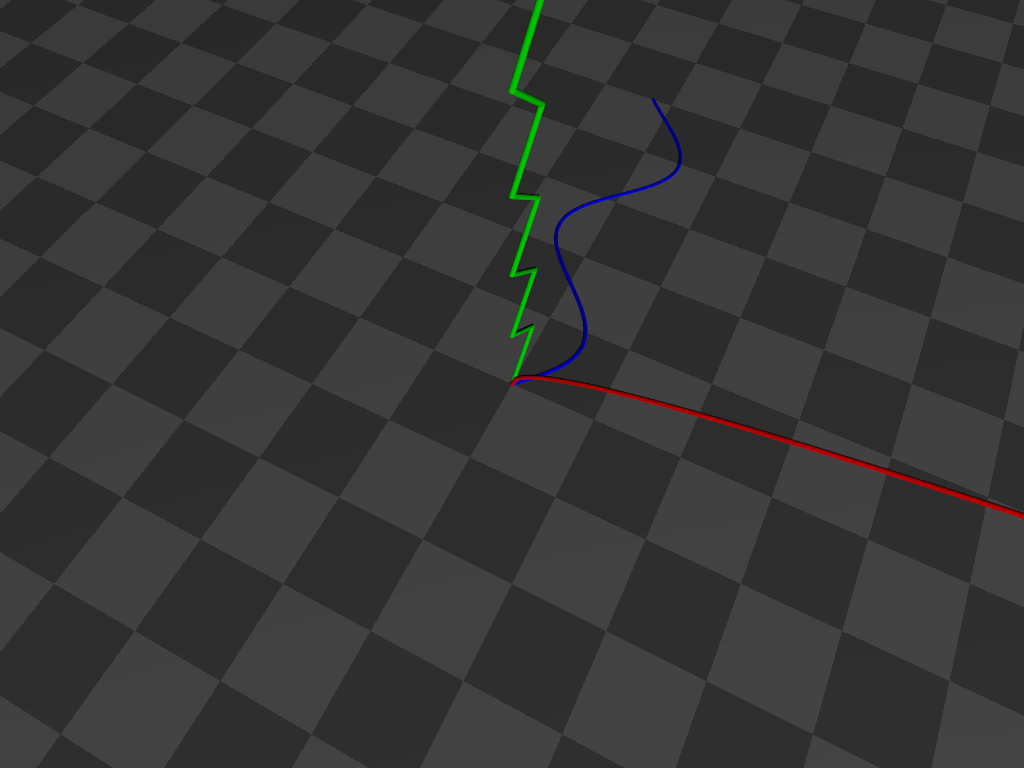
That's a little snippet from a mammoth .pov file, so below is a self-contained
script that you can read and play with. A different function is graphed along
each axis without having to specify each axis operation by hand.
------------------------------------------------------------------------------
// Scene file for demonstrating the use of the dot product for
// extracting the relevant vector component of a macro argument
// by converting it to an index value for direct use in select ()
// Bill "Bald Eagle" Walker 2026/03/21
// There are other ways to do this, but this highlights one of the
// MANY uses of the vector dot product.
#version version;
global_settings {assumed_gamma 1.0}
camera {
location <1/4, 1, -1/2>*15
right x*image_width/image_height
up y
look_at <0, 0, 0>
}
light_source {<40, 30, -50> rgb 1 shadowless}
sky_sphere {pigment {rgb 1}}
plane {y, 0 pigment {checker rgb 0.1 rgb 0.2} scale 2}
#declare E = 0.000001;
#declare Line = 0.05;
#declare Extent = 10;
#declare Step = 0.1;
#declare Vdot = function (Vx, Vy, Vz, Cx, Cy, Cz) {Vx*Cx + Vy*Cy + Vz*Cz}
#macro DotProduct (V1, V2)
#local V1x = V1.x;
#local V1y = V1.y;
#local V1z = V1.z;
#local V2x = V2.x;
#local V2y = V2.y;
#local V2z = V2.z;
Vdot (V1x, V1y, V1z, V2x, V2y, V2z)
#end
#declare even = function(x) {select(mod(x, 2), 0, 1, 0)}
#declare odd = function(x) {select(mod(x, 2), 1, 0, 1)}
#declare Cardinal = array {x, y, z}
#declare Selector = <-1, 0, 1>;
#local ZeroVector = <0, 0, 0>;
#declare FunctionX = function (N) {sqrt(N)}
#declare FunctionY = function (N) {abs(-odd(floor(N))+mod(N, 1))}
#declare FunctionZ = function (N) {sin (N)}
#declare V3 = function (N) {mod (N, 3)}
#declare AxisFunction = function (Switch, N) {
select (
Switch,
FunctionX (N),
FunctionY (N),
FunctionZ (N)
)
}
#for (Axis, 0, 2)
#local Vector = Cardinal [Axis];
//===============================================
#local Component = DotProduct (Vector, Selector);
//===============================================
#local Abscissa = Vector;
#local Ordinate = Cardinal [V3(Axis+1)];
union {
#for (i, 0, Extent, Step)
#local Value = AxisFunction (Component, i);
#local A = Abscissa * i;
#local O = Ordinate * Value;
#local Current = A + O + ZeroVector;
sphere {Current, Line}
#if (i > 0)
cylinder {Last, Current+E Line}
#end
#local Last = Current;
#end
pigment {rgb Vector}
}
#end net> wrote:
> A little coding or math trick.
Writing functions for a pigment {function {}} pattern with a scalar-only
function parser / VM can be painful.
For every vector, I need to evaluate 3 separate functions for each component,
and then when I need to daisy-chain functions together, that multiplies at every
step.
So one of the things I have come up with that makes this a little easier is to
extract the component that I need from the vector, and use select () to choose
which equation I need to evaluate based on a nice little operation.
select is a nice little function that gives me a way to use different equations
given the sign of some variable.
The easy way to remember this is to write select (N, -1, 0, 1).
Depending on the sign of N, I get the sign as the result.
You can put whatever you want in place of the sign when actually using this
mnemonic in practice.
To choose what equation you want would require you to remember that the pattern
is x=-1, y=0, and z=+1
But that's one more thing to forget, so we can make use of the dot product to
generate those values for us from the cardinal axis values themselves.
In POV-Ray, during the parse phase,
======================
x = <1, 0, 0>
y = <0, 1, 0>
z = <0, 0, 1>
The dot product takes the respective components of each vector, multiplies them
together, and then adds all the quotients to give a scalar value.
V1.x * V2.x +
V1.y * V2.y +
V1.z * V2.z
-------------
= dot product (V1, V2)
With POV-Ray's x, y, and z vectors, we are only ever multiplying anything by 0
or 1.
So what we do is take vector <-1, 0, 1> and calculate the dot product of that
with x, y, or z.
with x, you get 1 * -1, and the rest are zeros. Sum = -1
with Y, you get 1 * 0, and the rest are zeros. Sum = 0
with z, you get 1 * 1, and the rest are zeros. Sum = 1
This makes it easy to write macros that can take a vector argument and return a
function from a macro or the scalar result of a function from select ().
That's handy when you need to write a bunch of functions for x AND y AND z.
Because you can write a macro to assemble the function based upon which vector
you need.
MyMacro (x)
So you can either use an array of x, y, and z, or manually specify in your code
which one you want, and your intent is unambiguous.
This seems trivial.
It also requires a little bit of work up front to create the functionality, but
it makes handling functions along 3 different axes a lot more easily managed,
especially when you have A LOT of them.
In the macro below, I can assemble functions for each axis by using select() to
grab that vector component from an array using dot notation. This is
interesting because we're operating in the parser, not the function VM, so we
can use both arrays and dot notation to _construct_ a function.
Those values will remain static - which is fine because those are the vector
components of the control points for the Bezier surface, and don't need to
dynamically change during render phase.
#macro MakeVFn_BezierPatch (_Array, _Component)
// Assembles formula for ONE VECTOR COMPONENT of a Bezier patch
// (need to run THREE TIMES: once each for x, y, and z)
#local Degree = dimension_size (_Array, 1)-1;
function (_U, _V) {
#for (j, 0, Degree)
#for (i, 0, Degree)
#local _P =
select (_Component, _Array [i][j].x, _Array [i][j].y, _Array
[i][j].z);
Bernstein(Degree, i, _V) * Bernstein(Degree, j, _U) * _P +
#end
#end
0} // terminates equation for sum of all Bernstein polynomials in the patch
#end
That's a little snippet from a mammoth .pov file, so below is a self-contained
script that you can read and play with. A different function is graphed along
each axis without having to specify each axis operation by hand.
------------------------------------------------------------------------------
// Scene file for demonstrating the use of the dot product for
// extracting the relevant vector component of a macro argument
// by converting it to an index value for direct use in select ()
// Bill "Bald Eagle" Walker 2026/03/21
// There are other ways to do this, but this highlights one of the
// MANY uses of the vector dot product.
#version version;
global_settings {assumed_gamma 1.0}
camera {
location <1/4, 1, -1/2>*15
right x*image_width/image_height
up y
look_at <0, 0, 0>
}
light_source {<40, 30, -50> rgb 1 shadowless}
sky_sphere {pigment {rgb 1}}
plane {y, 0 pigment {checker rgb 0.1 rgb 0.2} scale 2}
#declare E = 0.000001;
#declare Line = 0.05;
#declare Extent = 10;
#declare Step = 0.1;
#declare Vdot = function (Vx, Vy, Vz, Cx, Cy, Cz) {Vx*Cx + Vy*Cy + Vz*Cz}
#macro DotProduct (V1, V2)
#local V1x = V1.x;
#local V1y = V1.y;
#local V1z = V1.z;
#local V2x = V2.x;
#local V2y = V2.y;
#local V2z = V2.z;
Vdot (V1x, V1y, V1z, V2x, V2y, V2z)
#end
#declare even = function(x) {select(mod(x, 2), 0, 1, 0)}
#declare odd = function(x) {select(mod(x, 2), 1, 0, 1)}
#declare Cardinal = array {x, y, z}
#declare Selector = <-1, 0, 1>;
#local ZeroVector = <0, 0, 0>;
#declare FunctionX = function (N) {sqrt(N)}
#declare FunctionY = function (N) {abs(-odd(floor(N))+mod(N, 1))}
#declare FunctionZ = function (N) {sin (N)}
#declare V3 = function (N) {mod (N, 3)}
#declare AxisFunction = function (Switch, N) {
select (
Switch,
FunctionX (N),
FunctionY (N),
FunctionZ (N)
)
}
#for (Axis, 0, 2)
#local Vector = Cardinal [Axis];
//===============================================
#local Component = DotProduct (Vector, Selector);
//===============================================
#local Abscissa = Vector;
#local Ordinate = Cardinal [V3(Axis+1)];
union {
#for (i, 0, Extent, Step)
#local Value = AxisFunction (Component, i);
#local A = Abscissa * i;
#local O = Ordinate * Value;
#local Current = A + O + ZeroVector;
sphere {Current, Line}
#if (i > 0)
cylinder {Last, Current+E Line}
#end
#local Last = Current;
#end
pigment {rgb Vector}
}
#end
Post a reply to this message
Attachments:
Download 'axisselection.png' (55 KB)
Preview of image 'axisselection.png'
|
|